There's no universal winner here. The right method depends on your run size, SKU count, how often your design changes, your color requirements, and your timeline. This guide breaks down both methods honestly so you can match the right technology to each job.
Key Takeaways
- Flexo uses physical plates and excels at high-volume, consistent, long-run label production
- Digital skips plates entirely, making it ideal for short runs, variable data, and frequent design changes
- Flexo costs more to set up but delivers lower per-label costs at scale — digital has minimal setup fees and faster changeovers
- The right method comes down to your volume, SKU variety, and how quickly you need labels in hand
- Many brands run flexo for core SKUs and digital for seasonal or short-run lines — a split approach that works well in practice
Flexographic vs. Digital Label Printing: Quick Comparison
| Dimension | Flexographic | Digital |
|---|---|---|
| Setup Requirements | Plates required per color | No plates — prints from digital files |
| Cost Structure | Higher upfront; lower per-unit at scale | Low/no setup cost; cost-effective at shorter runs |
| Best Run Size | High-volume, long runs | Short to mid-size runs |
| Color Capabilities | Pantone spot colors; up to 8 colors inline | CMYK / extended gamut; spot simulation available |
| SKU Flexibility | Low — each version may require new plates | High — multiple SKUs in one run |
| Variable Data | Not practical | Native capability (serial numbers, barcodes, QR codes) |
| Turnaround Time | Longer (plate creation adds lead time) | Faster job changeovers |
| Ideal Use Case | Flagship products, repeat orders, bulk runs | Launches, seasonal labels, multi-SKU programs |
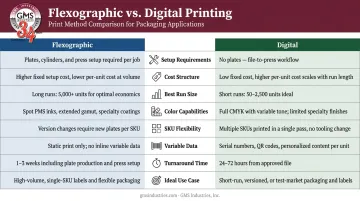
The cost crossover between these two methods shifts with every project. Run size, color count, and design complexity all determine where digital stops being cheaper than flexo — use this table as a starting point, then pressure-test it against your specific job specs.
What Is Flexographic Label Printing?
Flexographic (flexo) printing uses flexible photopolymer plates mounted on rotating cylinders to transfer ink directly onto label materials. Each color in the design requires its own plate — that plate investment is what separates flexo from digital printing, and it's the core reason flexo excels at volume while struggling with short runs.
Once a flexo press is set up and running, it's highly efficient. According to Smithers, around 43% of all labels were printed on flexographic presses as of 2020, a share that reflects how dominant the process remains in high-volume label production.
The tradeoff is setup investment. Plate creation, press registration, and the material consumed during calibration all add cost before the first good label comes off the press. That upfront burden becomes worthwhile when it's distributed across large quantities — but it works against you on short runs.
Where Flexo Works Best
Flexo's strengths align with specific production conditions:
- Long-run production where plate costs are spread across high volumes, driving per-unit costs down
- Exact Pantone spot color matching via dedicated ink stations — essential for brands where color precision is non-negotiable
- In-line finishing that applies flood coats, varnishes, and specialty inks in a single press pass
- Repeat orders for established SKUs where artwork is locked and rarely changes
Those conditions map directly to the industries where flexo has become the default choice.
Use Cases for Flexographic Label Printing
Flexo dominates wherever production efficiency at scale is the priority:
- Mass-market beverage labels: a single SKU printed in millions needs the per-unit cost advantage that flexo's press speed delivers
- Frozen food packaging: GMS Industries produces high-volume label programs for clients like Tattooed Chef, where design consistency across large runs is essential
- Household cleaning product labels: long runs with stable artwork make plate costs straightforward to justify
- Pharmaceutical compliance labels in bulk: repeat orders with identical regulatory text benefit from flexo's repeatability and throughput
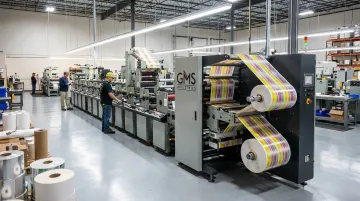
GMS Industries operates dedicated flexo label presses, including the Allied 300 Series (an 8-color, 10" press) and the Mark Andy 830 (a 3-color, 7" press), giving the team the equipment range to handle both complex multi-color label programs and simpler, shorter flexo jobs.
What Is Digital Label Printing?
Digital label printing eliminates plates entirely. Artwork files print directly onto label materials through an electrophotographic or inkjet process. No plates means no plate creation costs and no plate lead time — which fundamentally changes the economics for shorter runs and variable jobs.
Key operational advantages:
- Faster job changeovers — switching from one design to another takes minutes, not hours
- Multi-SKU consolidation — when label size and construction match, multiple SKU versions can run in a single job
- Variable data capability — serial numbers, barcodes, batch codes, QR codes, and regional text variants can be applied to individual labels without new plates
Color and Precision in Digital
Digital presses use CMYK and extended-gamut color systems to reproduce complex gradients, photography, and intricate artwork. HP states that the Indigo 6K+ can reach 97% of the Pantone color gamut with available inks — enough coverage to handle most brand color standards without spot ink.
For clients requiring precise color management, GMS Industries uses GMG workflow systems and ICC profiling for color-accurate proofing, allowing brands to review and approve colors before production begins. This infrastructure is particularly relevant for labels where brand color consistency across different substrates and print runs matters.
One note on Pantone spot colors in digital production: while extended-gamut workflows reproduce most Pantone colors accurately, true spot color matching should always be discussed with your printer before production to confirm it falls within the press's gamut and workflow.
Use Cases for Digital Label Printing
Digital fits where flexibility and fast response matter more than per-unit cost at scale:
- Product launches and test runs — commit to a manageable quantity before scaling to high-volume production
- Seasonal and limited-edition labels — holiday variants, promotional releases, and short-window products that don't justify plate investment
- High SKU-count programs — cosmetics brands managing multiple shades or formulations, food and beverage companies with regional or flavor variants
- Serialization and traceability requirements — pharma companies subject to FDA DSCSA requirements must include serialized 2D DataMatrix barcodes; digital handles this without new plates per batch
GMS Industries runs digital label programs for clients in food, consumer goods, and home fragrance. General Wax Co., for example, uses digital for seasonal releases like Halloween-themed candle labels — where fast turnaround and short runs make flexo plate investment impractical.
Flexographic vs. Digital Label Printing: Which Is Better for Your Brand?
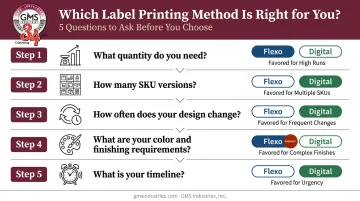
The better method depends on five variables. Before choosing, answer these:
- What quantity do you need? High volumes favor flexo; short to mid-size runs favor digital
- How many SKU versions does this job require? Multiple versions with different text or designs push toward digital
- How often does your design change? Frequent updates make plate investment hard to justify
- What are your color and finishing requirements? Exact Pantone spot colors or in-line specialty coatings lean toward flexo
- What's your timeline? Plate creation adds lead time that digital doesn't require
The Cost Crossover
Flexo becomes more cost-efficient as quantities scale because plate costs are distributed across more labels. At lower quantities, digital wins because it avoids plate investment entirely. Smithers has noted that adding digital capacity allows short runs to move off flexo equipment — freeing flexo presses for the long-run work where they're most efficient.
There's no universal crossover quantity. Your specific label size, color count, substrate, and finishing requirements all affect where the lines cross. This is the conversation to have with your label printer before committing to either method.
Situational Recommendations
Choose flexographic printing if:
- You're producing a large, consistent run of a flagship product
- Your design rarely changes between orders
- You need exact Pantone spot color matching
- Your label requires in-line finishing like flood coats, varnishes, or specialty inks
Choose digital printing if:
- You manage multiple SKUs or design versions
- Your labels change seasonally or with product reformulations
- You need variable data — serial numbers, barcodes, batch codes — on individual labels
- Your run sizes are short to mid-scale
- You're launching a product and want flexibility before scaling up
The Hybrid Approach
Most brands don't have to choose one or the other. Digital handles short-run or variable projects; flexo handles high-volume flagship labels. Some label programs combine both within a single production workflow — digital for the base print with flexographic stations providing finishing effects.
Working with a packaging partner experienced in both methods means your jobs get matched to the right technology rather than defaulted to whatever equipment is available.
GMS Industries has run both flexo and digital label production for food, cosmetics, consumer goods, and retail clients for over 36 years. If you're evaluating your label program and unsure which method — or combination — fits your needs, our team can walk through the specifics with you and recommend the right approach for your volumes, design cadence, and budget.
Conclusion
No single method wins across the board. Run size, SKU count, design complexity, and timeline determine the right call — and the answer can differ between two products from the same brand.
Before your next label order, work through the variables covered here. Matching the method to the job prevents plate costs from eroding short-run margins — and keeps you from paying digital per-unit rates on volume that flexo handles at a fraction of the cost. A printer that runs both methods, like GMS Industries with Allied and Mark Andy flexo lines alongside digital capability, can match the equipment to the job rather than fitting the job to the equipment they happen to own.
Frequently Asked Questions
What is the difference between digital and flexographic printing?
Flexographic printing uses physical plates to transfer ink onto label material, with a separate plate required for each color. Digital printing produces labels directly from digital files without plates. That core difference drives every cost, speed, and flexibility trade-off between the two methods.
What type of printer is best for labels?
There's no single best option for all labels. Flexographic presses are best for high-volume, consistent runs; digital presses are best for short runs, variable data, and multi-SKU programs.
Which label printing method is more cost-effective for small runs?
Digital printing is more cost-effective for short to mid-size runs because it eliminates plate costs and setup fees. Per-label costs drop further as quantity scales — flexo only becomes competitive once volume is high enough to absorb the plate investment.
Can digital and flexographic printing be combined for label production?
Yes. Many label programs use digital for the base print and flexographic stations during finishing — applying flood coats, specialty inks, or varnishes. The result: short-run variability with finishing effects like spot UV or matte varnish that digital alone can't produce.
Is digital label printing better for variable data and serialization?
Digital printing handles this directly. It applies unique information — serial numbers, barcodes, batch codes, regional text — to each label without requiring new plates. That makes it the practical choice for traceability programs, FDA DSCSA pharmaceutical compliance, and any label requiring unit-level serialization.