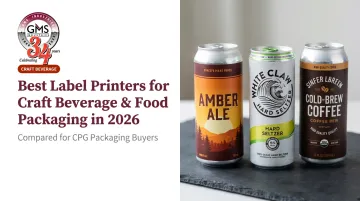
The operational pressure is real. According to the Brewers Association, U.S. craft brewing reached $28.8 billion in retail dollar value in 2024 across nearly 10,000 active breweries. Add roughly 11,000 wineries, 3,000+ craft distillers, and a specialty food market valued at over $200 billion, and you have an enormous field of producers competing for shelf attention — often without the print budgets of major CPG brands.
That's why the label printer decision matters. Choosing wrong means smeared compliance text, peeling edges, or a printer that burns out halfway through bottling season. This guide covers five of the most widely used options across small, mid-size, and high-volume craft operations in 2026.
Key Takeaways
- Pigment-based inkjet ink outperforms dye-based in cold, wet environments, making it the right call for refrigerated beverages and ice bucket use
- Production volume is the defining variable: desktop printers top out around 1,000 labels/day; production models can handle 10x that
- Five printers reviewed span entry-level ($1,549) to industrial, covering tasting room use through continuous bottling lines
- BOPP and polyester (PET) films are the standard substrates for curved, wet, or cold-surface beverage labels
- When volume outgrows in-house printing, professional label manufacturers deliver better per-label cost and consistent quality
Why Craft Beverage & Food Labels Have Unique Requirements
Craft beverage labeling sets a higher bar than almost any other category.
Labels in this sector must adhere to curved glass and aluminum surfaces, survive 24–48 hours of ice-water submersion, legibly render 6-point allergen disclosures and TTB Government Warning text, and communicate a brand strong enough to justify $18 for a four-pack.
Pigment vs. Dye Ink: Why It Matters Here
The ink technology you choose determines whether your label survives the cold chain — or doesn't:
| Attribute | Dye-Based Ink | Pigment-Based Ink |
|---|---|---|
| Water resistance | Poor — bleeds when wet | Excellent |
| UV/fade resistance | Susceptible | High |
| Color vibrancy | Superior saturation | Narrower gamut |
| Best for | Indoor, short-lived retail labels | Cold chain, wet environments, 2+ year durability |
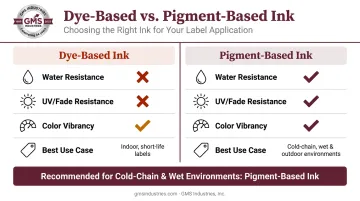
For most craft beverage applications — chilled bottles, canned beverages in ice, refrigerated food products — pigment-based ink is the safer default. Dye inks can work when paired with BOPP or PET substrates and proper topcoats, but they require careful material matching to approach equivalent durability.
The Compliance Floor
Durability and legibility aren't separate concerns — wet labels that bleed can render compliant text unreadable even when the print specs were met. FDA requires 1/16-inch type minimum for net quantity on small label panels and 6–8 point minimum for Nutrition Facts content. TTB mandates the Government Warning at 2mm minimum type with no more than 25 characters per inch.
Every printer reviewed here exceeds the resolution to hit these specs. The real risk is ink smearing in wet conditions, which makes a technically compliant label non-compliant in practice.
Best Label Printers for Craft Beverage & Food Packaging in 2026
These printers were evaluated across five criteria: color output quality, moisture resistance, label material compatibility, run volume capacity, and ease of integration into small to medium production workflows.
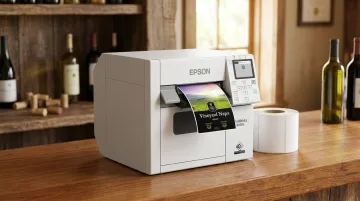
Epson ColorWorks CW-C4000e
The CW-C4000e is a compact desktop color inkjet printer from Epson's ColorWorks line, purpose-built for on-demand, short- to medium-run color label production. It's a common choice for tasting rooms, small wineries, and specialty food producers who update label designs frequently and can't justify ordering large batches from an outside printer every time something changes.
Its differentiating feature is Epson's UltraChrome DL pigment ink — a CMYK system with separate Gloss or Matte Black options depending on label substrate. That pigment formulation delivers real water and fade resistance.
The printer carries BS 5609 certification when used with compatible poly media — the standard durability benchmark for chemical and moisture resistance in label applications.
Connectivity covers USB 2.0 and Ethernet, with optional Wi-Fi via dongle — enough flexibility to plug into a tasting room POS or a small production network without a complicated IT setup.
| Spec | Detail |
|---|---|
| Print Technology / Ink | Pigment-based inkjet (UltraChrome DL); CMYK individual cartridges |
| Resolution | Up to 1,200 x 1,200 dpi |
| Print Speed | Up to 4 ips |
| Connectivity | USB 2.0, Ethernet, optional Wi-Fi |
| Media Width | 1" to 4.25" |
| Best For | Small wineries, tasting rooms, specialty food producers with frequent SKU changes |
Epson ColorWorks CW-C8000
Where the C4000e handles tasting room demands, the CW-C8000 is built for production lines. This is Epson's high-speed industrial-grade color label printer, and the specifications reflect that positioning.
Print speed reaches 11.8 ips (300 mm/sec) — roughly three times faster than the C4000e. The ink system uses UltraChrome DL pigment inks (SJIC47P packs) with a total ink capacity of 1.9L, designed for extended runs without constant cartridge changes. Like its smaller sibling, it carries BS 5609 certification for durability.
The integration story is what separates it from desktop alternatives. The CW-C8000 supports ZPL II, SAP, and ESC/Label command languages, connects to automated label applicators via I/O port, and offers cloud management via Epson Cloud Solution PORT. For breweries or food manufacturers running continuous bottling shifts, this is the level of integration that matters.
One honest note: Epson doesn't publish an official monthly label volume figure. Third-party sources estimate 35,000 labels/day — treat that as directional, not a guaranteed spec.
| Spec | Detail |
|---|---|
| Print Technology / Ink | Pigment-based inkjet (UltraChrome DL); CMYK ink packs |
| Resolution | Up to 1,200 x 1,200 dpi |
| Print Speed | Up to 11.8 ips |
| Integration | ZPL II, SAP, ESC/Label; automated applicator I/O port |
| Best For | Mid-to-large breweries, wineries, and food manufacturers with high daily volumes and bottling line needs |
VIPColor VP750
The VP750 occupies the high-speed commercial tier with a different approach to moisture resistance. VIPColor uses aqueous dye-based ink rather than pigment, but pairs it with media compatibility across gloss, semi-gloss, and matte stocks up to 8.5 inches wide — one of the broadest width ranges in this category.
Speed is a genuine strength: up to 12 ips, which VIPColor rates at approximately 1,000 6x4-inch labels in under 10 minutes. For craft operations printing large label runs with complex brand graphics, that throughput matters.
The key caveat: dye ink's water resistance depends heavily on substrate selection. BOPP and PET films with appropriate topcoats can bring VP750 labels close to pigment-ink durability in cold environments, but this requires deliberate material choices — not automatic performance.
For labels that will spend hours submerged in ice, verify your media pairing before committing to a full production run.
| Spec | Detail |
|---|---|
| Print Technology / Ink | Aqueous dye-based inkjet |
| Resolution | Up to 1,600 x 1,600 dpi |
| Print Speed | Up to 12 ips |
| Media Width | 2.0" to 8.5" |
| Best For | Craft breweries needing high-speed output with strong brand color performance; best paired with moisture-resistant substrates |
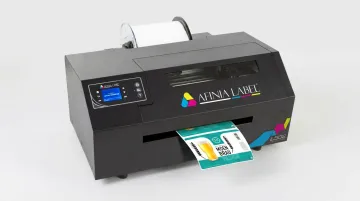
Afinia L502
The L502's defining feature is its DuraPrime Duo Ink Technology — an interchangeable system that lets operators switch between dye and pigment ink cartridges on the same printer. No other printer in this comparison offers that flexibility.
In practical terms: run dye ink for your showcase retail labels where color saturation is the priority, then switch to BS5609-certified pigment ink for products destined for cold storage or ice exposure. For a distillery managing a premium gift-shelf spirits line alongside a refrigerated mixer line, that's genuinely useful without buying two printers.
Print resolution reaches 4,800 dpi, and the recommended volume range of 2,500–20,000+ labels/month positions it solidly in mid-range territory — above desktop output without crossing into full production-line territory. The all-steel industrial cover and 2-inch display give it more durability than its price tier might suggest.
| Spec | Detail |
|---|---|
| Print Technology / Ink | Interchangeable dye and pigment inkjet (DuraPrime Duo) |
| Resolution | Up to 4,800 dpi |
| Print Speed | ~5.2 ips |
| Media Width | Up to 8.5" print width |
| Recommended Volume | 2,500–20,000+ labels/month |
| Best For | Distilleries, craft breweries, and food brands managing multiple product lines with varying durability requirements |
Primera LX500e
The LX500e is the entry point — and for the right producer, it's entirely sufficient. At $1,549, it's accessible for micro-breweries, cottage food producers, and new craft brands printing their first product runs.
Speed tops out at 2.5 ips with a practical ceiling of around 1,000 labels/day. The ink system is dye-based, which means moisture resistance depends on substrate selection. It connects via USB only — no Ethernet or Wi-Fi — which limits production line integration but keeps setup simple for standalone tasting room use.
Label design software includes BarTender UltraLite (PC) and Label LIVE (Mac), plus compatibility with Adobe Illustrator. Neither platform provides dedicated FDA/TTB compliance templates, so producers need to build and verify regulatory layouts manually.
| Spec | Detail |
|---|---|
| Print Technology / Ink | Dye-based inkjet |
| Resolution | Up to 1,200 x 4,800 dpi |
| Print Speed | Up to 2.5 ips |
| Max Daily Volume | ~1,000 labels/day |
| Price | $1,549 |
| Connectivity | USB only |
| Best For | Startups, micro-breweries, cottage food producers, and early-stage craft brands with low-to-moderate label volumes |
How We Chose the Best Label Printers
The most common mistake in this category is choosing on upfront cost alone. A $1,500 dye-ink printer looks attractive until labels start smearing in condensation three months into bottling season — or until the printer's duty cycle gives out under daily production demand.
Evaluation Criteria
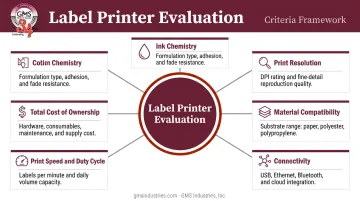
Every printer in this list was assessed against the following:
- Ink chemistry — pigment vs. dye performance in chilled and wet environments
- Print resolution and color accuracy — capacity to reproduce brand graphics and fine compliance text reliably
- Label material compatibility — support for gloss, matte, BOPP, and polyester films
- Connectivity and integration — USB-only vs. Ethernet/Wi-Fi vs. production-line middleware support
- Print speed and duty cycle — actual throughput against real production demands
- Total cost of ownership — in-house inkjet label printing typically runs $0.03–$0.07 per label, but ink type, media cost, and reprint waste all affect that number
The Volume Threshold That Actually Matters
Published duty cycle data is inconsistent across manufacturers. Epson measures the C4000e's durability in feed inches (150 km), not monthly label counts. VIPColor publishes no volume guidance for the VP750 at all. The clearest real-world threshold: if you're consistently printing more than 1,000–2,500 labels per day, the 3–5x speed advantage of production-grade printers (CW-C8000 at 11.8 ips, VP750 at 12 ips) becomes operationally meaningful and economically justified.
When In-House Printing Reaches Its Limits
Some brands eventually hit a ceiling that desktop printing can't clear — specialty finishes, shrink sleeves, or large-format runs that require commercial equipment. At that point, a professional label manufacturer makes more sense than scaling in-house hardware.
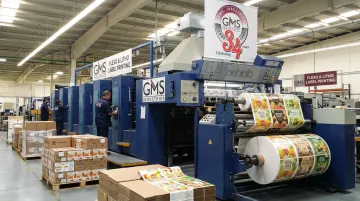
GMS Industries produces custom pressure-sensitive labels using flexographic and litho printing, with inline aqueous and UV coating options not available on desktop equipment. Their minimum order starts at 1,000 labels, and they serve craft beverage and food clients nationally from production facilities in El Paso, TX and Mexicali, Mexico.
Conclusion
No single printer fits every craft operation. The right choice comes down to three variables: ink durability relative to your storage conditions, print speed relative to your production pace, and media compatibility relative to your container format — glass bottles, aluminum cans, PET, pouches.
Before committing, calculate your actual total cost of ownership: ink, media, and maintenance over 12 months, not just the purchase price. Then pilot test any shortlisted printer with your specific label stock and container surface. What works beautifully on matte paper at room temperature can fail on gloss BOPP pulled straight from a cold room.
For craft beverage and food brands that want professionally manufactured labels — including pressure-sensitive labels with specialty finishes, compliance-ready designs, and runs from 1,000 units and up — GMS Industries produces flexo and litho pressure-sensitive labels with 36 years of food and beverage packaging experience behind every run. Reach out to Kris Glidden at kris@gmsindustries.com or visit gmsindustries.com/contact-us to start a consultation.
Frequently Asked Questions
What are the highest-rated label printers for craft beverage and food packaging?
The Epson CW-C4000e leads for small operations and tasting rooms, the CW-C8000 for high-volume production environments, and the VIPColor VP750 for fast throughput with strong color performance. The best choice depends on your daily volume and storage conditions — particularly whether labels will face cold temperatures or condensation.
What is the difference between a label maker and a label printer?
Label makers (like Brother P-touch) produce simple text or monochrome labels on narrow tape, designed for organizational use. Label printers are full-color inkjet or thermal devices that produce professional, brand-quality product labels on roll stock — the standard for craft beverage and food packaging where FDA/TTB compliance and brand graphics are required.
What type of ink is best for label printers used in cold or wet environments?
Pigment-based inkjet ink is the better choice for cold and wet conditions. It deposits solid particles on label surfaces rather than absorbing into the substrate, making it far more resistant to water, smearing, and fading. Dye-based ink can work with the right substrate pairing (BOPP or PET with topcoat), but pigment is the reliable choice for refrigerated or ice-exposed applications.
Can I print food compliance labels (nutrition facts, allergens, TTB) with a desktop label printer?
Yes — all five printers reviewed here produce sufficient resolution for FDA and TTB required text. Most bundled software (including BarTender UltraLite) lacks pre-built regulatory templates, so producers must build and verify compliance layouts manually before production runs.
How do I know when my label volume justifies upgrading from a desktop to a high-volume printer?
Once you're consistently exceeding 1,000–2,500 labels per day or running continuous bottling shifts, a production-grade printer's 3–5x speed advantage reduces per-label cost and prevents premature wear. The Primera LX500e caps around 1,000 labels/day; the CW-C8000 and VP750 both run at 11.8–12 ips.
What label materials work best for craft beer cans and wine bottles?
BOPP (biaxially oriented polypropylene) and polyester (PET) films are the industry-standard substrates for wet, cold, and curved-surface beverage applications. They resist moisture absorption, conform to curved surfaces, and are compatible with specialized adhesives engineered for ice-bucket endurance. Match your finish (gloss or matte) to your printer's ink type to ensure proper adhesion and print quality.